
Wednesday, May 09, 2012


Tuesday, May 01, 2012
Create your LAPTOP as WIFI hotspot and SHare LAN / Wired Internet
Create your LAPTOP as WIFI hotspot and SHare LAN / Wired Internet
Hello Folks found this interesting article on internet do tell me whether it works or not.
This article will help you convert your Windows XP and Vista based laptop in a Wireless HotSpot. One you setup your laptop as HotSpot then you do not need a router, switch, hub, etc… to form a network, in fact other laptops or PC’s can connect or access the internet through this newly created HotSpot
What do I need to set a HotSpot?
1. Active Cable Internet
2. Laptop
3. WiFi on Laptop
4. Wired net connection
Once you have all the above things mentioned, you are all set to follow the steps:
How to setup HotSpot on Windows Vista:
1. Got to Control Panel
2. Click on “Network and Sharing Centre”
3. Under Tasks choose “Setup New Connection”
4. Wireless “Ad-hoc network”
5. Now type in a “Network Name”
6. Choose “WEP” password if you don’t want to share the connection with the entire world
7. Click “Internet connection sharing”
8. Done!
Now a WiFi enabled machine will be able to connect to the network you have just setup with the WEP password
Lets setup a HotSpot on a Windows XP machine:
1. Go into Control panel
2. Open “Network Connections”
3. Right click on "Wireless Connection" and click on "Properties"
4. Click on the "Wireless Networks" tab and select the check-box which says “Use Windows to configure my wireless network settings”
5. Under “Prefered networks” click “Add”
6. Type a name in “Network name” text box
7. Select “Shared” from the options under “Network Authentication”
8. Under Data encryption select “WEP” and type in your password in “Network Key” field and now click "OK"
9. Now the new HotSpot should show in the list of preferred networks.
10. Click on the “Advance” button and select “Computer-to-computer (ad hoc) networks only" and press close
11. Hit “OK”, we are done with the wireless connection properties
One more step, we have to change something in the wired connection setting so that it knows that it has to share connection with the computers accessing our HotSpot.
1. Go to local Area Connections, right click it and select properties
2. Go to the “Advanced” tab and under Internet Connection Sharing check the box which says “Allow other network users to connect through this computer’s internet connection” and make sure the box under that is NOT selected so that no one can disable the network remotely.
3. Hit “OK”
I hope this helps setting up a wireless connection without a WiFi router. Have FuN!

Monday, April 09, 2012
Scaling to different screens
Scaling to different screens

Thursday, March 22, 2012 6:05 AM
There’s a ton of innovation in the world of displays—from pixel density, to aspect ratio, to core technologies. Windows 8 is designed to grow and improve as the display ecosystem grows and improves. Our goal is to support the broadest range of display technologies so PC makers can build PCs or you can use external displays that provide the best experience for your needs. To do this, we architected the WinRT to provide the platform necessary to support this diversity. This is a complex post that looks at the details and nuances around supporting many permutations of physical screen dimensions, pixel densities, and resolutions. There’s a lot more to this than “my 27” monitor,” as you can see in this post authored by David Washington, a senior program manager on our User Experience team.One of the core promises of the Windows platform has been its support for diverse form factors, allowing Windows to power over a billion PCs in the market today. In Windows 8, we set out to build upon this strength by delivering a great experience regardless of the form factor or screen size. Windows 8 PCs will come in a variety of shapes and sizes, from small tablet screens to laptops and large desktop monitors and multi-monitor setups. They will also scale to different pixel densities; from that of the typical tablet to new high-definition tablets. The following principles guided us in our design process:
--Steven
- Offer customers a broad choice of form factors while providing a polished, consistent, and predictable user experience.
- Enable developers to easily build apps that look great on all form factors in the Windows ecosystem.
Windows 8 will power all these PCs and experiences, and as people transition between different sized screens in their day-to-day lives, they will be greeted with a consistent and familiar experience. This breadth of hardware choice is unique to Windows and is central to how we see Windows evolving.
In Windows 8, apps power the user experience, so providing a development platform that makes it easy for developers to create a beautiful user interface that scales to all screens is paramount. For this primary reason, Windows 8 was engineered from the ground up to be a platform for making great apps that work on a variety of screens.

Device diversity
Looking at the breadth of devices that will run Windows 8, we can classify their screens in several ways.- Screen size: There will be PCs with different screen sizes, from the smaller screens on tablets, to medium sized laptops, and large desktops and all-in-ones. These screens will also come in different shapes or aspect ratios.
- Screen resolution: Screens will have an increasing number of pixels on screen, or screen resolution. In general, the larger the screen, the higher the screen resolution, but this isn’t always the case.
- Pixel density: Screens will also have different pixel densities, which is the number of pixels within a physical area, or dots per inch (DPI.) The pixel density increases as the screen resolution increases, but the screen size remains constant.
This graphic shows a sample of the diversity of common wide-screen aspect ratios and screen sizes that Windows 8 can run on. Windows will support just about any screen dimension so long as the graphics driver and hardware combination provide the correct information to Windows. In addition, some screens will scale to different aspect ratios via cropping and/or stretching. And although we indicate slate or laptop in the diagram below, please keep in mind that these are “fuzzy” boundaries that are getting more fuzzy all the time.

Minimum resolution
I’ve seen a few blog comments that ask specifically about minimum resolution, for example on Designing the Start screen in October 2011, @wolf asked:“A better idea would force all developers to make sure all Metro app[s] [are designed for] a minimal screen size of 800x600. Limiting Metro apps to only 1024x768 will cut out all netbook users as well as hurt the Windows App Store."We chose a minimum screen resolution of 1024x768 in order to make it as simple as possible for developers to create great apps that work on all the different screens that are available now and in the future. A minimum resolution provides a necessary starting place for developers, who can use it as a baseline to ensure that all of the navigation, controls, and content fit on screen. As we worked on different design layouts for apps, we found that the higher the minimum resolution, the richer and more tailored the app could be. We wanted developers to be able to tailor and refine their layouts to make use of every available pixel on 1024x768, without having to compromise the layout for a smaller resolution.

Windows 8 has a minimum resolution to allow developers to create rich layouts that make the best use of space at 1024x768
Why choose 1024x768 as a minimum?
We chose 1024x768 as a minimum for Metro style apps for three reasons.- It is large enough to support the rich and beautiful layouts that we expect to see with Metro style apps. Lower resolutions, like 800x600 for example, require simpler more basic layouts with less content.
- Websites are typically designed for 1024x768 as the minimum (or only) resolution, and web developers are used to targeting this resolution.
- Looking at the data about devices in the marketplace today, we see that only 1.2% of active Windows 7 users have screens with a resolution of less than 1024x768. When designing a new platform that supports the devices of today and tomorrow (with undoubtedly higher resolutions) we optimized for the majority of today’s screens (i.e. 98.8%) without sacrificing the experience and complicating the developer story for legacy screens. In addition, the runrate of new PCs with screen sizes of 1024x600 and 1280x720 has dramatically fallen and, to the best of our knowledge, almost no new mainstream PCs are being manufactured with this resolution. We are aware of purpose-built machines that run at lower resolutions, which are built for specialized desktop apps as well. While many run virtual machines, VMs can easily support 1024x768 even though many default to lower resolution.

A world without a minimum
Some people have asked why we enforce the minimum resolution instead of just communicating it as a loosely supported recommendation. Enforcing the requirement simplifies the lives of developers as they never have to take these lower screen resolutions into consideration—they can just rule them out. If an app isn’t designed with consideration for lower resolutions, some layouts could truncate, wrap, or break in unpredictable ways. Developers would not be able to confidently build apps to look good on all devices that Windows 8 supports. If we were to have a loose requirement, some developers might build and test for these lower resolutions, while others might not, yielding a fractured ecosystem where developers start targeting specific devices instead of the platform as a whole. Also, developers might target the least common denominator and pick the lowest possible resolution, which in turn would be detrimental to the user experience and quality of the apps.
The layout of this game would be truncated at the bottom if allowed to run on 1024x600
Minimum resolution and snap
The resolution that supports all the features of Windows 8, including multitasking with snap, is 1366x768. We chose this resolution as it has enough horizontal pixels to fit the 320px width of a snapped app, next to a main app with a 1024px width. The specs of the Samsung tablet that we unveiled at the //build/ conference are 11.6-inches with a 1366x768 resolution (the Samsung Series 7 tablet in market today). These specs are the minimum screen resolution that supports all the features of Windows 8 on a useful physical size.
The snap view is always a fixed 320px wide, which allows developers to refine and create a targeted view for this size. A width of 320px is a common and familiar size that developers are already designing for on various phone platforms.
Some people have asked why we don’t allow for the snap view to be arbitrarily sized, or offer a variety of different multitasking sizes. Supporting arbitrary sizes for this small of a layout can significantly increase the complexity of building an app, and would require a lot of additional work and complexity from the developer.
Although the width of a snapped app remains fixed, the vertical space increases to fit the screen, so on larger screens you won’t have to scroll as much. The //build/ talk 8 traits of great Metro style apps provides many great snapped layout examples. We will discuss snap and multitasking more in a future post.
Below are several examples, with the snapped app layout on the left, and the primary app layout on the right.

Is there a maximum resolution?
You may be wondering why there isn’t a maximum resolution. With higher resolutions there is more space, so the layout is really never broken or truncated on higher resolution screens. You can run Metro style apps on a screen as big as 30” with a resolution of 2560x1600! But although apps aren’t broken when they have more space, developers should give some consideration to these larger resolution screens, so that they make use of the space in a way that keeps their apps looking beautiful.Larger screen sizes
On larger screens like desktop monitors, people generally expect to fit more content on the screens—as the screen size increases, screens have more pixels. The below diagrams demonstrate how, when the screen size and number of pixels increase, the number of objects of the same size on screen also increases. On the small screen below we can fit about 40 orange squares, and on the larger screen we can fit 84 squares of the same size.
Larger screens generally have more pixels and can therefore show more content
But just because more content can fit on screen this doesn’t mean every app will
make use of this space. If an app is designed with fixed dimensions or a
specific form factor in mind, larger monitors may display a large empty
region, as in the example below. This is not a good experience, as some
have commented.Regardless of your large screen resolution, today most websites are not particularly well tailored for large screens and tend to leave lots of space (many users prefer to zoom in on the text using the CTRL key and the mouse wheel on large displays, or the keyboard shortcuts CTRL+, CTRL -, CTRL 0). This is the same on the mobile web, when sites are too big to fit on a mobile display. More and more web developers are adapting their content to different form factors by using a combination of form-factor detection and the use of apps.

Without consideration for different screen sizes, many apps would have large empty regions when shown on larger screens
The Windows 8 platform makes building one app that scales to
different screen sizes straightforward for the developer by providing
built-in layout controls and techniques. Apps in Windows 8 fill the
available space by bringing in more content where possible. A developer
can easily build the same app to show more content as the screen size
changes from a tablet, to a laptop with a bigger screen, all the way up
to a desktop monitor. For example, this news app shows more articles on
bigger screens. It should be noted that the underlying platform and
tools have been developed to provide support for asynchronous
programming which also enables “filling” larger displays, and making
them just as fast and fluid as smaller displays—there’s no need to block
the user while fetching and filling large amounts of content.
Building apps for larger screen sizes
Windows 8 has been designed to work in a predictable and consistent way for screens of different sizes and shapes across tablets, laptops, and desktop monitors. When a user changes to a different sized screen, it’s important that the system and apps make the best use of the screen space that’s available to provide the most immersive experience.
With adaptive layouts like this sample app created for the Developer Preview
at //build/, users see more content on larger screens
One way that Windows 8 helps app developers to adapt their apps for
this variety is through support in the app platform for standards-based
adaptive layouts. Building an app layout that looks great on different
screens has been a challenge in the past on the web. Rather than
inventing a new, proprietary set of layout controls, Windows 8 has
built-in support for the familiar adaptive layout techniques from XAML,
and for the W3C ratified set of CSS3 features, which were designed
specifically to make this easier for web developers.at //build/, users see more content on larger screens
In HTML, the CSS3 grid, flexible box, and multi-column layouts help developers use screen real estate more effectively across a variety of devices and resolutions.
The CSS3 grid layout allows a developer to specify the rows and columns of their layout; it is similar to using an HTML table but provides much more control and flexibility. A grid is also great for defining a top-level adaptive layout that is similar to the ones that you see in the Windows 8 UI (like the Start screen and the file picker). You define the rows and columns, and then place your content into the cells of the grid. It is simple to define which cells should adapt and reflow to the screen.

CSS3 flexible box layout allows a developer to distribute margins and whitespace equally and predictably. It’s great for laying out individual components and collections like toolbars and image collections.
Finally, CSS3 multi-column layout can be used to arrange content into multiple columns on the page, similar to the layout of a newspaper or magazine. All of the templates provided with Visual Studio 11 use these layout constructs and leverage the ListView and other controls to support different sized screens by default. Developers can use the same standards-based layout techniques and controls that help them accommodate different screen sizes to also help them adapt the layout to different orientations and snapped views. All of the layout constructs available in HTML are available for XAML developers as well.
Some apps, particularly games and game-like rendered UI, do not wish to take advantage of more space with higher screen resolutions. For these apps we provide a way to easily scale an app that was designed for 1366x768 to fit any screen. If the aspect ratio doesn’t match the content, the system provides theme-able letterboxing regions as well. While this isn't ideal for all UI because it may make things appear quite large on desktop monitors, it does work well for many games and game-like UI that is composed mostly of bitmap graphics. This solution also allows apps to remain immersive on a variety of screens without needing significant work from the developer.

With fixed layouts like this 5inarow game, users see the game bigger on larger screens
We believe it is important for app developers to be able to choose
which layout technique—adaptive or scaled to fit—makes the most sense
for them, depending on their content and their workflow. If all apps
were adaptive, it would be difficult to build game-like rendered UI that
fills a 23” 1920x1080 screen without huge empty margins. On the other
hand, if all apps were scaled to fit, users wouldn’t be able to see more
email messages on their 23” 1920x1080 screen. We believe that our
solution strikes the right balance, and provides developers with the
choice and tools to optimize their apps for different screens based on
the scenarios that are most important for them.You might be wondering why we don't just let apps arbitrarily resize and not worry about any of this. That is a reasonable question given the history of resizable windows in Windows. In fact, the first version of Windows supported "tiled" Windows and it was not until Windows 2.0 that overlapping windows were supported. We focused on tailored full-screen layouts for Metro style apps for all of the reasons you have just read, along with the desire to have reliable experiences at many resolutions.
This may seem counter-intuitive given our experience in Windows every day. But as we look across many apps and the ever expanding screen sizes available to us all, it has become clear that developers are no longer optimizing for the diversity of screens available. Though most software lists minimum requirements, in practice, we see many errors—with UI that is clipped, awkwardly placed, or just poorly rendered when windows are resized or maximized. We also see assets (icons and UI elements) that do not properly scale to a variety of pixel densities. Even in the designs of the ribbon in Office 2007, much effort went into scaling the ribbon, as you can see in this series of screen shots.

Image from Scaling up, scaling down on Jensen Harris: An Office User Interface blog
Unfortunately, most applications do not take advantage of controls
that are already available (like the Windows ribbon) to successfully
scale. As a result, end-users have to learn how big or small to make a
window and developers have to deal with bugs and inconsistencies in
resolutions that they might not be testing for, since they cannot
prepare for all resolutions, aspect ratios, and pixel densities. As
developers created their own layouts, controls, and UI metaphors they
also built in assumptions about screen resolution and pixel density
required for their code, but rarely enforced these (even today, Windows
property sheets clip at below 600 pixels as some have seen with early
netbooks or on VMs).In general, while many reading this blog find arbitrary window sizes something they can manage and arrange, data consistently shows two things. First, on laptops (over 75% of PCs purchased by consumers) most applications are run maximized all the time—this makes sense given the real estate available and the design points of most interfaces and web sites. Second, on large screen displays, most windows are sized to a reasonable number of rough dimensions primarily because most programs do not support “infinite” scaling.
We're going to see new user interface approaches and new ways to organize commands. Windows 8 contains a very rich control library and vastly more flexible tools and languages for coding user interface layouts than any previous release. And of course, the Windows desktop is still there (and is improved), where you can continue to work with the capabilities you are used to for the apps you currently use.
Different pixel densities
Pixel density is a new concept to a lot of people but it is closely tied to our discussion here of screen size and screen resolution. Basically, the pixel density is the number of pixels in a physical area. This is commonly described as dots per inch, or DPI. As the pixel density increases, the physical size of fixed pixels decreases. Some of you may have observed how text can be very small on very high-resolution laptops. Historically many are familiar with “large fonts” or “make text bigger” settings on the desktop to compensate for these physics. Windows 8 takes this to a new level of support for WinRT applications.

On higher pixel density screens, without scaling, physical sizes are smaller.
Most of us are used to fairly low-pixel densities in laptop and
desktop monitors; for example, a common laptop with a 13” screen size
and a resolution of 1280x800 has 116 DPI. Because of the active
ecosystem bringing different displays to market we are seeing incredible
advances in the pixel densities of screens on the market. Many Windows 8
tablet PCs will have pixel densities of at least 135 DPI - much higher
than many of us are used to. Of course we’ve seen the introduction of HD
tablets with Full HD 1920x1080 resolution on an 11.6” screen, with a
pixel density of 190 DPI or quad-XGA tablets with 2560x1440 on the same
11.6” screen; that’s a pixel density of 253 DPI. Pixel densities can
increase even more on lesser aspect ratios and smaller screens as we see
in the new iPad. As the pixel density increases, the physical size of
objects on screen gets smaller. If Windows wasn’t built to accommodate
different pixel densities, objects on screen would be too small to
easily tap or read on these tablets.
Without scaling, objects are too small to tap easily on a higher pixel-density screen, like the HD tablet on the right.
For those who buy these higher pixel-density screens, we want to
ensure that their apps, text, and images will look both beautiful and
usable on these devices. Early on, we explored continuous scaling to the
pixel density, which would maintain the size of an object in inches,
but we found that most apps use bitmap images, which could look blurry
when scaled up or down to an unpredictable size. Instead, Windows 8 uses
predictable scale percentages to ensure that Windows will look great on
these devices. There are three scale percentages in Windows 8:- 100% when no scaling is applied
- 140% for HD tablets
- 180% for quad-XGA tablets

With scaling in Windows 8, physical sizes are
maintained on high pixel density devices, and text and content on screen
is crisper.
The percentages are optimized for real devices in the ecosystem. 140%
and 180% may seem like odd scale percentage choices, but they make
sense when you think about how this will work on real hardware.For example, the 140% scale is optimized for 1920x1080 HD tablets, which has 140% of the baseline tablet resolution of 1366x768. These optimized scale factors maintain consistent layouts between the baseline tablet and the HD tablet, because the effective resolution is the same on the two devices. Each scale percentage was chosen to ensure that a layout that was designed for 100% 1366x768 tablets has content that is the same physical size and the same layout on 140% HD tablets or 180% quad-XGA tablets.

The scale percentages in Windows have been designed to maintain touch targets and
layouts, while optimizing for real tablets coming on the market in the near future.
Some might be curious about the new iPad screen. For this screen,
Apple has chosen a scale factor of 200%. The new screen has twice the
pixel density (132 PPI to 264 PPI)* on the same size screen. Because iOS
and developers only need to support the predefined resolutions, they
only need to design for this one additional scaling factor. In the case
of iPad 2 compared to new iPad the 200% scaling factor means that what
you see on 1024x768 is exactly what you see on the new resolution, only
sharper because more pixels are used (as in the image of the app above).
Additionally, on higher pixel-density screens like the new iPad,
developers for games and other performance-critical apps may decide the
right balance between letterboxing and running at a lower fidelity to
deliver the best experience (frame rate, for example).layouts, while optimizing for real tablets coming on the market in the near future.
Scaling is invisible to the user and Windows implements it automatically based on screen dimensions, without the need for intervention from the user, IT administrator or OEM vendor. Developers just need to make sure images look great on each of the scale percentages. Because these scaling percentages are predictable, developers who provide images for each percentage can easily avoid any blurriness or artifacts due to image stretching.
Pixel density offers another variable where the existing paradigms of toolbars and menus are becoming increasingly burdensome to use. "Hacks" such as large fonts or tricking the system into using a different DPI are just that—hacks. As anyone who has used a high-DPI screen can tell you, existing applications and the UI paradigms simply don't function, and become unusable. A typical example is when a common toolbar button becomes a diminishingly small square, and menu heights and text become too small to read and navigate. Obviously personal preference plays a role, and the ability to tweak the system can help, but neither of these is a reliable way to make sure Windows is usable on a new generation of hardware.
Windows 8 has been designed to provide developers with the easiest way for to reliably build software that works on the widest variety of hardware, and top provide consumers with the most consistently rich experience using that software. It is important not to look at this in isolation as "no more resizable windows," but rather as part of a larger effort to provide a wider choice of screen sizes, resolutions, and densities, where developers can know their apps will work and consumers can be sure that their apps are compatible with their hardware. We do this so you don't have to compromise by using software that isn't fully functional or only getting to choose among a small set of screen sizes (and price points, power consumption, etc.)
Building apps for higher pixel densities
Windows 8 also makes it simple to develop apps that work across different pixel densities. First of all, no manual work needs to be done in order for the app to scale. Unlike previous releases, you won’t need to do any work to make your apps DPI-aware; there are frameworks in place to scale the app for you. Just by using web-standard CSS pixel units or a XAML layout, app layouts will scale proportionally. When an app is scaled up, images are stretched and could get blurry, but Windows 8 makes it easy for developers to keep these images looking crisp and beautiful.
Windows 8, the platform natively supports vector graphics. Any images exported as SVG (Scalable Vector Graphics) or XAML art will scale without getting blurry. Additionally, Windows 8 introduces automatic resource loading so developers can save three versions of images with a naming convention; images that correspond to each of the current scale percentages (100%, 140%, and 180%) load automatically to keep images crisp on high DPI. Developers can also use the CSS3 resolution media query or the system events to reload images at different scales. Windows 8 scaling to pixel density allows developers to achieve a baseline level of quality with little effort, and then tailor their images to look polished and crisp on high pixel density screens.

Testing apps on different screens
Even though Windows makes it easy to build beautiful apps that work well on different screens, it is still important to test apps on those different screen sizes. We realize that most people don’t have a plethora of devices at their immediate disposal, so we built support for testing apps on different screens into the tools. Visual Studio 11 offers the Windows Simulator, which allows developers to run their apps on a variety of screen sizes, orientations, and pixel densities. Switching to a different screen size is just as easy as choosing an option from a menu.
The Windows Simulator lets you test for different screens
Microsoft Expression Blend 5 offers a platform menu that allows you
to design your apps on different screen sizes and pixel densities as you
go. The Blend canvas can update dynamically depending on the display
dimensions you choose on the platform menu.
Microsoft Expression Blend 5 includes options to design for different screens
Recap
A lot of planning, thinking and development are involved in making sure that Windows 8 scales across different screens and form-factors. For users, Windows 8 offers an experience that is predictable and consistent across devices. On larger screens, they can see more content in each app. On higher pixel-density screens, they get a crisp, premium experience that is easy to read and easy to interact with via touch or keyboard and mouse. For developers, Windows 8 makes it easy to support different screen sizes and pixel densities through standards-based and well known layout techniques, and by automatically scaling to pixel density. All while allowing developers to tailor their experiences to be great on each form factor.We look forward to you trying Windows 8 on different screens!
Thanks,
David
*A typo in the second PPI number was corrected on 3/22/2012. Apologies for the error
Sunday, March 18, 2012
Microsoft Office 2007 All Edition Keys
```````````````````````````````````````````Office 2010 Retail Keys`````````````````````````````````````
"""""""""""""""""""""""
-----------------------------------------------------------------
Office Professional Plus 2010 Retail Keys
-----------------------------------------------------------------
Office Professional 2010 76XCJ-YMH2W-YQQV6-XX76X-QK3K7
Office Professional 2010 XJ2G2-TDQ49-3MW8D-F4FCT-KPTT6
Office Professional 2010 BGCKH-CRYRT-49VQ7-YMCG3-BRBP7
Office Professional 2010 W4D2C-3YK88-KMYP2-2QTXY-28CCY
Office Professional 2010 9GVVR-X6VJT-WDDXD-YB4M2-RQ7CV
Office Professional 2010 2K79J-DVFWG-MJT2Q-BX82R-T9PDV
Office Professional 2010 6QFDX-PYH2G-PPYFD-C7RJM-BBKQ8
Office Professional 2010 BDD3G-XM7FB-BD2HM-YK63V-VQFDK
Office Professional 2010 YHDT7-WPQX9-BCYDM-6VJ9K-KRDMW
Office Professional 2010 6TX3V-WRDJ6-JC34X-BDDPV-6F3PB
Office Professional 2010 KGTM8-XGW8X-D3PWD-8HPHW-4JJ42
Office Professional 2010 MRQV4-9Y8W3-KDDPH-K2PG4-MCH2Q
Office Professional 2010 TTK27-44W3B-PVC8K-XJQW8-KJMVG
Office Professional 2010 2VQRW-HFRGP-733PM-Y737F-K7BBB
Office Professional 2010 H2VKD-G9CBT-D2JXH-JFTT6-C22WF
Office Professional 2010 PYVW4-KHTM7-6WPTF-VVDHV-826D8
Office Professional 2010 YDCTD-DKK23-4C3P9-CP8RB-9VVBV
Office Professional 2010 CXQWG-BJWPX-VWWCJ-CJJGV-29G2T
Office Professional 2010 TVFJ7-76TR7-HHCKT-QQFJR-8KTTD
------------------------------------------------------------------------------------
>>>>>>>>>>>>>>>>>>>>>>>>>>>>>>>>>>>>>>>>>>>>>>>>>>>>>>>>>>>>>>>>>>>>>>>>>>>>>>>>>>>>
------------------------------------------------------------------------------------
Office Standard 2010 Retail Keys
------------------------------------------------------------------------------------
Office Standard 2010 RBGD6-W6H22-DCV7P-DPX66-6K46B
Office Standard 2010 2RCKD-J4JH4-7DJKD-JVFCR-G798M
Office Standard 2010 BHT9V-4BTX2-FFRK8-THVHP-8WDBP
Office Standard 2010 XG79Q-PQBHJ-F8DJP-WH8KD-QRP2G
Office Standard 2010 34B4Q-BXK9M-VB4X2-JG39J-6GDTQ
Office Standard 2010 4DDJ8-DM67D-GJPT2-32H93-9MMWK
Office Standard 2010 82DB6-BXG6H-QKBT6-3G42H-PPWM3
Office Standard 2010 D34M3-3279D-HHPB3-DQPPQ-JHHFX
Office Standard 2010 24PR2-JW928-QPKTK-CPD26-RYV3C
Office Standard 2010 4JPCP-DJF9V-WX7PT-B9WX2-R47C6
Office Standard 2010 7TF8R-933DG-MCBQR-TXPM7-G4JRM
Office Standard 2010 6R7J3-K4CB9-PG7BR-TVDBG-YPGBD
Office Standard 2010 HXJQ4-VT6T8-7YPRK-R2HQG-CYPPY
Office Standard 2010 4G66W-HC3BK-HP397-XM3QQ-X73DC
Office Standard 2010 Q7CR2-2VQMW-QKTMG-B2X22-944HP
Office Standard 2010 GJQTP-MDGJR-32HTW-6YPP6-Q3D33
Office Standard 2010 2J8F9-MC8G4-87VXX-WM29C-WFD7C
Office Standard 2010 C6VBM-2HY4G-CD2G8-YFCMJ-R3YVT
Office Standard 2010 RBGD6-W6H22-DCV7P-DPX66-6K46B
Office Standard 2010 2RCKD-J4JH4-7DJKD-JVFCR-G798M
Office Standard 2010 BHT9V-4BTX2-FFRK8-THVHP-8WDBP
Office Standard 2010 XG79Q-PQBHJ-F8DJP-WH8KD-QRP2G
Office Standard 2010 34B4Q-BXK9M-VB4X2-JG39J-6GDTQ
------------------------------------------------------------------------------------
<<<<<<<<<<<<<<<<<<<<<<<<<<<<<<<<<<<<<<<<<<<<<<<<<<<<<<<<<<<<<<<<<<<<<<<<<<<<<<<<<<<<
------------------------------------------------------------------------------------
Office Professional Plus 2010 Volume License Keys
------------------------------------------------------------------------------------
Office Professional Plus 2010 VYBBJ-TRJPB-QFQRF-QFT4D-H3GVB
Office Standard 2010 V7QKV-4XVVR-XYV4D-F7DFM-8R6BM
Office Home and Business 2010 D6QFG-VBYP2-XQHM7-J97RH-VVRCK
Access 2010 V7Y44-9T38C-R2VJK-666HK-T7DDX
Excel 2010 H62QG-HXVKF-PP4HP-66KMR-CW9BM
SharePoint Workspace 2010 QYYW6-QP4CB-MBV6G-HYMCJ-4T3J4
InfoPath 2010 K96W8-67RPQ-62T9Y-J8FQJ-BT37T
OneNote 2010 Q4Y4M-RHWJM-PY37F-MTKWH-D3XHX
Outlook 2010 7YDC2-CWM8M-RRTJC-8MDVC-X3DWQ
PowerPoint 2010 RC8FX-88JRY-3PF7C-X8P67-P4VTT
Project Professional 2010 YGX6F-PGV49-PGW3J-9BTGG-VHKC6
Project Standard 2010 4HP3K-88W3F-W2K3D-6677X-F9PGB
Publisher 2010 BFK7F-9MYHM-V68C7-DRQ66-83YTP
Word 2010 HVHB3-C6FV7-KQX9W-YQG79-CRY7T
Visio Premium 2010 D9DWC-HPYVV-JGF4P-BTWQB-WX8BJ
Visio Professional 2010 7MCW8-VRQVK-G677T-PDJCM-Q8TCP
Visio Standard 2010 767HD-QGMWX-8QTDB-9G3R2-KHFGJ
------------------------------------------------------------------------------------
<<<<<<<<<<<<<<<<<<<<<<<<<<<<<<<<<<<<<<<<<<<<<<<<<<<<<<<<<<<<<<<<<<<<<<<<<<<<<<<<<<<<
------------------------------------------------------------------------------------
Visio And Project 2010 Keys
-----------------------------------------------------------------
Project Professional 2010 GB9CQ-38GPG-4QK3K-YYBJT-M9KR7
Project Professional 2010 HWXJY-BV6PG-W3HCW-XWHGG-68WY3
Project Professional 2010 D43GR-8BF89-8FV79-2Y9WP-2RWXP
Visio Professional 2010 7MXWK-Q7W73-8YJW8-7BT67-FDF87
Visio Professional 2010 TWFX2-WFPV6-3TC7M-WDVX4-F89JK
Visio Professional 2010 H4F7B-FQVBX-RRWMB-6MFRR-BB2BW
Project Standard 2010 7PQJR-RH7PX-QFB2F-QPGW4-Q377V
Visio Standard 2010 228H4-T92MF-Q8PQJ-CGWRG-8KW92
Visio Premium 2010 C383V-HPHMC-Y6KWM-BDBHM-MK97G
Visio Premium 2010 GPXXP-HGXBG-D4W6D-638DR-92V4F
Visio Premium 2010 PQCFB-YGXGC-TXB66-DH3VW-GCGYQ
InfoPath 2010 XDGJY-KFHW9-JWX9X-YM4GW-GC8WR
````````````````````````````````````````````````````````````````````````````````````````````
Microsoft Office 2007 All Edition Keys
==========================================================================================
Office 2007 Ultimate
====================
T8RQ2-XTH2T-7CHTM-YGGDJ-RHBMB
DX4MW-77FBJ-34V3P-B8R9W-C77YB
FP29Y-YDBVF-GB4FV-MW4HX-YFDDY
CXMTT-QYBV6-TFT7Q-2MFYP-HF9QY
CJ9GX-94YWY-29WTK-86R2F-3DMMB
BDVWR-GRM69-T6VP2-3RKT2-QFT3Y
H6TTY-M2F23-HGKMB-YGMBM-X947M
QV6Q8-4VG9H-VV6WD-PBHCQ-KXT3Y
VBGV6-HBQ9Q-4CMMY-VH83T-CDXQY
T94DB-CBDHT-92272-FM7FK-VHRBB
QJRJK-J2VGB-G7DFK-GHPHX-2YVYB
Office Professional Plus 2007
=============================
MTP6Q-D868F-448FG-B6MG7-3DBKT
WCRWK-Y637K-4MRCB-2YQXY-4BGWW
TT3M8-H3469-V89G6-8FWK7-D3Q9Q
VB48G-H6VK9-WJ93D-9R6RM-VP7GT
HCFPT-K86VV-DCKH3-87CCR-FM6HW
MTP6Q-D868F-448FG-B6MG7-3DBKT
WCRWK-Y637K-4MRCB-2YQXY-4BGWW
TT3M8-H3469-V89G6-8FWK7-D3Q9Q
VB48G-H6VK9-WJ93D-9R6RM-VP7GT
HCFPT-K86VV-DCKH3-87CCR-FM6HW
Office 2007 EnterPrise Keys
=============================
V9MTG-3GX8P-D3Y4R-68BQ8-4Q8VD
T3PVR-XX42X-T49DW-WGBG6-9FT73
XDMXR-YT3RP-FRQPY-R27HY-3HFMJ
KYD7X-V68CW-X7XR8-MJDVC-D66HW
JFRVW-CT2GY-67VK4-P2MRD-KYJBJ
RW7WV-D88C8-3TX72-GBP2F-R9MYJ
GYHR8-7FGYM-KB2GF-HF6QY-VW8BJ
JWDVB-6YQ62-TBXGW-9B3HC-PDRMJ
BD9MX-78FY7-DXD9G-G36MB-VG6HW
T7TVJ-M8XD8-D98G2-VQ2BM-YPQQ8
HPRWG-3H2DG-M283Q-3GX3K-B83Q8
JXTY9-RKQGR-BKVG2-GFC8T-27QQ8
B9QJ2-PMKWH-H8948-77PQB-78W7W
KWD4J-PBD9Y-W2XBB-376CT-GCWBJ
B849D-4PH7Y-J7FGM-TBHFF-RGPVW
RQXC2-4CBTY-KV4XT-36T3W-3YDQ8
TMGQ9-F4JMD-6VDH6-QPYGF-KX87W
JT3M4-C7F3Q-42XRT-PYMP3-D4MYJ
F3DJD-6FFQ4-XQTQF-PGK47-8MDQ8
V9MTG-3GX8P-D3Y4R-68BQ8-4Q8VD
CM9R7-9X4DV-F43J4-JVC67-GYDQ8
H86Q7-F86BG-KBWRQ-YQXQH-HD3Q8
F3DJD-6FFQ4-XQTQF-PGK47-8MDQ8
T3PVR-XX42X-T49DW-WGBG6-9FT73
XDMXR-YT3RP-FRQPY-R27HY-3HFMJ
KYD7X-V68CW-X7XR8-MJDVC-D66HW
JFRVW-CT2GY-67VK4-P2MRD-KYJBJ
RW7WV-D88C8-3TX72-GBP2F-R9MYJ
GYHR8-7FGYM-KB2GF-HF6QY-VW8BJ
JWDVB-6YQ62-TBXGW-9B3HC-PDRMJ
BD9MX-78FY7-DXD9G-G36MB-VG6HW
T7TVJ-M8XD8-D98G2-VQ2BM-YPQQ8
KGFVY-7733B-8WCK9-KTG64-BC7D8
HPRWG-3H2DG-M283Q-3GX3K-B83Q8
JXTY9-RKQGR-BKVG2-GFC8T-27QQ8
B9QJ2-PMKWH-H8948-77PQB-78W7W
KWD4J-PBD9Y-W2XBB-376CT-GCWBJ
B849D-4PH7Y-J7FGM-TBHFF-RGPVW
RQXC2-4CBTY-KV4XT-36T3W-3YDQ8
TMGQ9-F4JMD-6VDH6-QPYGF-KX87W
JT3M4-C7F3Q-42XRT-PYMP3-D4MYJ
XP6X8-4G4HK-H2D3R-CTVW9-QRX38
CKX77-9C3TY-YFR68-M8KTB-6MDQ8
Q783C-XBHDT-4K3HD-WKF34-M9THW
RHF9V-PMVP6-C7TKC-RKKRC-FMVD8
VC3TY-M9FCT-YDFT9-XB2GK-PHJ7W
CHF3Y-HR8MH-V9M3Y-Y4W9G-7G938
MMCGV-RXK9R-2HTCW-FJWTV-DDBYJ
CMG9R-7BCPX-6CTXJ-CX8V2-CFHD8
KKDQD-YVYXR-G3VD9-F96WM-XKMYJ
FRDRK-X7GT8-6PYX8-RFGXF-PRMYJ
BBDFT-MXDY9-QFHW4-QRQW8-KDW7W
WV4H7-CCKRW-PJRWD-W3V8M-QHFMJ
WY6M2-2PYKJ-M3KQC-YB2YM-F8K38
GJGGF-HRD8B-72G24-FQM7D-6RTHW
DWR2Y-WMQRJ-7V3RK-HH7QD-BRHD8
VDCFP-P2V2V-G46YQ-WTCG7-GVWBJ
FM43K-688MP-VVYDW-BY38W-CVWBJ
XKKHD-HRG4J-K4HTF-X296T-TJW7W
G66FV-7DDKB-3DBV9-YXWBG-3TVD8
VPPQG-KJQPR-BTMWF-79CH9-H88BJ
PCG64-M8CF7-TGCJV-YH6GF-MYPVW
C6R6F-HFRYY-9RGH9-K6HBC-8QGHW
WJMT4-P3TWY-Q2FDY-648F4-294MJ
DY9MH-68PK6-BDTVP-TTFTJ-MXX38
V7MF8-7VBPV-FQQ4G-DPRJ2-DCWBJ
WKT4B-BPM48-QW7CK-2CQV3-WMDQ8
HJ9WD-XTWYM-8J6TF-KGF27-BJGHW
MCF4X-HYB49-9G9H7-44P9B-WDRMJ
J39WR-PW3TV-66JBF-YQHBV-8VQQ8
THFJ8-WP826-FK8PM-PWK9J-XJBYJ
Office Professional 2007
========================
TT3M8-H3469-V89G6-8FWK7-D3Q9Q
TBMFM-QXMQX-G8FVP-BFH9J-X9PHM
FHH8R-7WC4H-BH696-VBV6D-VCBMB
RHT43-PDJWT-JMKPB-8WTW7-WWG3Y
QG7TR-DHG94-W2YKQ-MY6VK-PK9QY
TT3M8-H3469-V89G6-8FWK7-D3Q9Q
tt3m8-h3469-v89g6-8fwk7-d3q9q
HCFPT-K86VV-DCKH3-87CCR-FM6HW
VB48G-H6VK9-WJ93D-9R6RM-VP7GT
HCFPT-K86VV-DCKH3-87CCR-FM6HW
Office 2007 Home & Student Keys
===============================
HBC66-D6YR7-CRP7H-T8VP4-99PMW
QXMDH-CRYFM-QFR87-HB783-T7RFQ
P37JV-FYJ32-YHH3T-KX7GX-7BJY3
HRMGX-K8WKJ-7FBGW-FTBCY-DWCM3
RCFMT-WFT7M-R779R-BJQMB-M2KWD
T9HJX-4C3BM-MG2R6-WC933-RCBRT
BTT7P-9HBFP-6QHM7-RFHDV-X8XWG
HWMMV-7H4DT-J2PJ6-YB8X4-VQCM6
JM2QC-KMVTP-VR8GV-HJRKQ-YWXWG
BHD34-K6BT7-T6PXP-BXKT4-X3G8D
DDH8T-C2JGD-G6MWW-6CYBV-BDTB6
MHCC4-WV74B-FTWPV-YM9JR-W3VWD
HBC66-D6YR7-CRP7H-T8VP4-99PMW
QXMDH-CRYFM-QFR87-HB783-T7RFQ
P37JV-FYJ32-YHH3T-KX7GX-7BJY3
HRMGX-K8WKJ-7FBGW-FTBCY-DWCM3
RCFMT-WFT7M-R779R-BJQMB-M2KWD
T9HJX-4C3BM-MG2R6-WC933-RCBRT
BTT7P-9HBFP-6QHM7-RFHDV-X8XWG
HWMMV-7H4DT-J2PJ6-YB8X4-VQCM6
JM2QC-KMVTP-VR8GV-HJRKQ-YWXWG
BHD34-K6BT7-T6PXP-BXKT4-X3G8D
DDH8T-C2JGD-G6MWW-6CYBV-BDTB6
B4MKP-KP9YP-7TBQ4-7T4XF-MTGWY
HBC66-D6YR7-CRP7H-T8VP4-99PMW
JWR9T-HFR92-74RQ7-3FRMB-CY676
DDY79-433JV-2RXGX-MQFQP-PFDH8
WRGJQ-2J2HB-8XP8D-6J2YK-BMFFD
HX2HC-MJM6Q-4487F-23FMP-9VKV8
HX2DJ-36TJX-CRVRJ-C72Q8-CJTBQ
V82W3-BM72R-XRHWG-CP69F-4FPMT
VHGFG-FVMY3-HHP46-RXVDJ-8R6BY
TC2QP-QBCP7-WQ62V-WBF92-WWG73
WQ27D-PY77P-R9CQK-MCPPB-QGJYQ
Office 2007 Small Edition Keys
==============================
KKVXH-TFFPB-QGJDY-DJYG4-K3QBJ
REFERRAL KEY : QW2E3G8K
------------------------------------More Office 2007 Apps Keys----------------------------
**************************
Microsoft Office Professional Plus 2007:
* MTP6Q-D868F-448FG-B6MG7-3DBKT
* TT3M8-H3469-V89G6-8FWK7-D3Q9Q
Microsoft Office Home and Student 2007:
* HBC66-D6YR7-CRP7H-T8VP4-99PMW
* QXMDH-CRYFM-QFR87-HB783-T7RFQ
* P37JV-FYJ32-YHH3T-KX7GX-7BJY3
* HRMGX-K8WKJ-7FBGW-FTBCY-DWCM3
* RCFMT-WFT7M-R779R-BJQMB-M2KWD
* T9HJX-4C3BM-MG2R6-WC933-RCBRT
* BTT7P-9HBFP-6QHM7-RFHDV-X8XWG
* HWMMV-7H4DT-J2PJ6-YB8X4-VQCM6
* JM2QC-KMVTP-VR8GV-HJRKQ-YWXWG
* BHD34-K6BT7-T6PXP-BXKT4-X3G8D
* DDH8T-C2JGD-G6MWW-6CYBV-BDTB6
Microsoft Office 2007 Standard:
* KCBJJ-67B9Q-KQXF2-VQV2V-6TXJ3
Microsoft Office Visio Professional 2007:
* QB6MH-Q82HX-BFWPK-8TXTY-HHJT6
Microsoft Office Groove 2007:
* R83W8-GJQ82-GJ37QW9W-JBYKT
Microsoft Office OneNote 2007:
* TFKGD-9VXBG-T22DK-FQB9P-MBPG6
Microsoft Office SharePoint Designer 2007:
* VQCR8-6KP8Q-Y2FTW-3YQD7-R22G6
Microsoft Office Enterprise 2007:
~~~~~~~~~~~~~~~~~~~~~~~~~~~~~~~~~
* KGFVY-7733B-8WCK9-KTG64-BC7D8
* FR2MQ-C9Y99-PJJJV-RXRYG-M3W7W
* T3PVR-XX42X-T49DW-WGBG6-9FT73
Microsoft Office Ultimate 2007:
~~~~~~~~~~~~~~~~~~~~~~~~~~~~~~~
* J67F8-BB7GM-8VPH2-8YMXP-K49QQ
* WRWWX-G9MMD-X4B8X-7JQP3-CMD93
* RYC22-PRMXB-8HP8W-384PD-GXHX3
* VM98J-C9X4C-MM7YX-93G64-BJMK3
* VK626-MQWCC-FXXWY-W2H6F-KVKQQ
* PGHBF-6K7PC-J9989-BGGJD-TKT3Q
MICROSOFT OFFICE + FRONT PAGE :
~~~~~~~~~~~~~~~~~~~~~~~~~~~~~~~
Office XP Professional with FrontPage – GBJ7J-7MYPV-RJ46R-RQJXJ-WQ2CM
Office Professional 2007 —VMRGQ-G3YMP-RWYH2-4TQ97-CT2HD
Office Ultimate 2007 —VJPW8-MB6MR-8D8YM-TW37V-WYVX3
Office Professional Plus 2007 —VBQJ8-CBP7J-CP4BH-Q9GFW-B8X
Office System Beta 2 2007 —RQCRJ-FCTYM-V3PDF-GRD46-9YHXQ
Outlook 2007 -DB4QP-GTFT3-FT3T6-VHHJ9-98XQQ
Office System Groove Server 2007 Beta 2 —WCMWF-H7DD9-3R2Q6-QM863-G7XD6
Office System Project Server 2007 Beta 2 —CYGH3-KVXBH-JDQV3-FFYPP-XGKD3
Office System SharePoint Server 2007 Beta 2 —C39KH-VHBKR-KT62D-Q4FVG-4PB76
FrontPage Professional 2003 —RV3CJ-VCB3D-9PY99-YDKX8-9MG2T
EXCHANGE :
~~~~~~~~~~
Exchange Server 2007 Enterprise Edition —PYYMB-HQQMQ-3TBM2-XJ99F-83XVM
Exchange Server 2007 Standard Edition —W3MX6-2WXMD-QB887-4WGPK-VPVDY
Forms Server 2007 —K76FH-Y2JHK-9BGCR-37KPR-4Y6JQ
Project Portfolio Server 2007 —QRPKT-683CC-MJ9VJ-FHBCC-HYKGD
Project Server 2007 —GM27X-X6X37-T69MH-98J3Q-44TKG
SHARE POINT :
~~~~~~~~~~~~
SharePoint Server 2007 Enterprise Edition — F6YVR-4XY7K-RCVY4-37FBK-G44PY
SharePoint Server 2007 for Search Enterprise Edition — P87VV-Q34RV-GW2HT-JVXWV-3VFPM
SharePoint Server 2007 for Search Standard Edition — MYBJH-6YGQQ-6WW3C-FGM3V-YY6JW
SharePoint Server 2007 Standard Edition — WFF2P-M8XYH-3B33C-6KPP9-XVQTG
SharePoint Designer 2007 — T9CJK-W68FW-D9FX6-37HG3-XHF7D
ACCESS + GROOVE + INFOPATH:
~~~~~~~~~~~~~~~~~~~~~~~~~~
Access 2007 — HP44H-VWH8K-J7T22-QD3KC-37F7D
Groove 2007 - MCW9C-WTKM4-KRHBQ-CPYJQ-YYD93
Groove Server 2007 — R4X9H-MP2C6-CV2FX-QGPKY-93RPG
InfoPath 2007 – C3R8F-TMMYD-TBGDP-2RDXT-88393
InterConnect 2007 - P2BJF-HGV87-RRFB7-8DVQR-F23DQ
OneNote 2007 – GJ2V8-K8CHV-7QP4V-K23TM-CMQDQ
Project Professional 2007 — T7CBB-KW6DD-VTHB9-6V4D4-K3393
Project Standard 2007 — G2XT7-K47QK-BFVXC-83T9M-8Y63Q
Publisher 2007 – VC3PJ-TBV6V-XWG4P-2GRBH-RVWVD
Visio Professional 2007 — JVBKC-PVJRX-MCT9J-JV7FK-JXYK3
Visio Standard 2007 – VYK2W-K2Q3Y-MRCTC-WRWMY-8JCHD
"""""""""""""""""""""""
-----------------------------------------------------------------
Office Professional Plus 2010 Retail Keys
-----------------------------------------------------------------
Office Professional 2010 76XCJ-YMH2W-YQQV6-XX76X-QK3K7
Office Professional 2010 XJ2G2-TDQ49-3MW8D-F4FCT-KPTT6
Office Professional 2010 BGCKH-CRYRT-49VQ7-YMCG3-BRBP7
Office Professional 2010 W4D2C-3YK88-KMYP2-2QTXY-28CCY
Office Professional 2010 9GVVR-X6VJT-WDDXD-YB4M2-RQ7CV
Office Professional 2010 2K79J-DVFWG-MJT2Q-BX82R-T9PDV
Office Professional 2010 6QFDX-PYH2G-PPYFD-C7RJM-BBKQ8
Office Professional 2010 BDD3G-XM7FB-BD2HM-YK63V-VQFDK
Office Professional 2010 YHDT7-WPQX9-BCYDM-6VJ9K-KRDMW
Office Professional 2010 6TX3V-WRDJ6-JC34X-BDDPV-6F3PB
Office Professional 2010 KGTM8-XGW8X-D3PWD-8HPHW-4JJ42
Office Professional 2010 MRQV4-9Y8W3-KDDPH-K2PG4-MCH2Q
Office Professional 2010 TTK27-44W3B-PVC8K-XJQW8-KJMVG
Office Professional 2010 2VQRW-HFRGP-733PM-Y737F-K7BBB
Office Professional 2010 H2VKD-G9CBT-D2JXH-JFTT6-C22WF
Office Professional 2010 PYVW4-KHTM7-6WPTF-VVDHV-826D8
Office Professional 2010 YDCTD-DKK23-4C3P9-CP8RB-9VVBV
Office Professional 2010 CXQWG-BJWPX-VWWCJ-CJJGV-29G2T
Office Professional 2010 TVFJ7-76TR7-HHCKT-QQFJR-8KTTD
------------------------------------------------------------------------------------
>>>>>>>>>>>>>>>>>>>>>>>>>>>>>>>>>>>>>>>>>>>>>>>>>>>>>>>>>>>>>>>>>>>>>>>>>>>>>>>>>>>>
------------------------------------------------------------------------------------
Office Standard 2010 Retail Keys
------------------------------------------------------------------------------------
Office Standard 2010 RBGD6-W6H22-DCV7P-DPX66-6K46B
Office Standard 2010 2RCKD-J4JH4-7DJKD-JVFCR-G798M
Office Standard 2010 BHT9V-4BTX2-FFRK8-THVHP-8WDBP
Office Standard 2010 XG79Q-PQBHJ-F8DJP-WH8KD-QRP2G
Office Standard 2010 34B4Q-BXK9M-VB4X2-JG39J-6GDTQ
Office Standard 2010 4DDJ8-DM67D-GJPT2-32H93-9MMWK
Office Standard 2010 82DB6-BXG6H-QKBT6-3G42H-PPWM3
Office Standard 2010 D34M3-3279D-HHPB3-DQPPQ-JHHFX
Office Standard 2010 24PR2-JW928-QPKTK-CPD26-RYV3C
Office Standard 2010 4JPCP-DJF9V-WX7PT-B9WX2-R47C6
Office Standard 2010 7TF8R-933DG-MCBQR-TXPM7-G4JRM
Office Standard 2010 6R7J3-K4CB9-PG7BR-TVDBG-YPGBD
Office Standard 2010 HXJQ4-VT6T8-7YPRK-R2HQG-CYPPY
Office Standard 2010 4G66W-HC3BK-HP397-XM3QQ-X73DC
Office Standard 2010 Q7CR2-2VQMW-QKTMG-B2X22-944HP
Office Standard 2010 GJQTP-MDGJR-32HTW-6YPP6-Q3D33
Office Standard 2010 2J8F9-MC8G4-87VXX-WM29C-WFD7C
Office Standard 2010 C6VBM-2HY4G-CD2G8-YFCMJ-R3YVT
Office Standard 2010 RBGD6-W6H22-DCV7P-DPX66-6K46B
Office Standard 2010 2RCKD-J4JH4-7DJKD-JVFCR-G798M
Office Standard 2010 BHT9V-4BTX2-FFRK8-THVHP-8WDBP
Office Standard 2010 XG79Q-PQBHJ-F8DJP-WH8KD-QRP2G
Office Standard 2010 34B4Q-BXK9M-VB4X2-JG39J-6GDTQ
------------------------------------------------------------------------------------
<<<<<<<<<<<<<<<<<<<<<<<<<<<<<<<<<<<<<<<<<<<<<<<<<<<<<<<<<<<<<<<<<<<<<<<<<<<<<<<<<<<<
------------------------------------------------------------------------------------
Office Professional Plus 2010 Volume License Keys
------------------------------------------------------------------------------------
Office Professional Plus 2010 VYBBJ-TRJPB-QFQRF-QFT4D-H3GVB
Office Standard 2010 V7QKV-4XVVR-XYV4D-F7DFM-8R6BM
Office Home and Business 2010 D6QFG-VBYP2-XQHM7-J97RH-VVRCK
Access 2010 V7Y44-9T38C-R2VJK-666HK-T7DDX
Excel 2010 H62QG-HXVKF-PP4HP-66KMR-CW9BM
SharePoint Workspace 2010 QYYW6-QP4CB-MBV6G-HYMCJ-4T3J4
InfoPath 2010 K96W8-67RPQ-62T9Y-J8FQJ-BT37T
OneNote 2010 Q4Y4M-RHWJM-PY37F-MTKWH-D3XHX
Outlook 2010 7YDC2-CWM8M-RRTJC-8MDVC-X3DWQ
PowerPoint 2010 RC8FX-88JRY-3PF7C-X8P67-P4VTT
Project Professional 2010 YGX6F-PGV49-PGW3J-9BTGG-VHKC6
Project Standard 2010 4HP3K-88W3F-W2K3D-6677X-F9PGB
Publisher 2010 BFK7F-9MYHM-V68C7-DRQ66-83YTP
Word 2010 HVHB3-C6FV7-KQX9W-YQG79-CRY7T
Visio Premium 2010 D9DWC-HPYVV-JGF4P-BTWQB-WX8BJ
Visio Professional 2010 7MCW8-VRQVK-G677T-PDJCM-Q8TCP
Visio Standard 2010 767HD-QGMWX-8QTDB-9G3R2-KHFGJ
------------------------------------------------------------------------------------
<<<<<<<<<<<<<<<<<<<<<<<<<<<<<<<<<<<<<<<<<<<<<<<<<<<<<<<<<<<<<<<<<<<<<<<<<<<<<<<<<<<<
------------------------------------------------------------------------------------
Visio And Project 2010 Keys
-----------------------------------------------------------------
Project Professional 2010 GB9CQ-38GPG-4QK3K-YYBJT-M9KR7
Project Professional 2010 HWXJY-BV6PG-W3HCW-XWHGG-68WY3
Project Professional 2010 D43GR-8BF89-8FV79-2Y9WP-2RWXP
Visio Professional 2010 7MXWK-Q7W73-8YJW8-7BT67-FDF87
Visio Professional 2010 TWFX2-WFPV6-3TC7M-WDVX4-F89JK
Visio Professional 2010 H4F7B-FQVBX-RRWMB-6MFRR-BB2BW
Project Standard 2010 7PQJR-RH7PX-QFB2F-QPGW4-Q377V
Visio Standard 2010 228H4-T92MF-Q8PQJ-CGWRG-8KW92
Visio Premium 2010 C383V-HPHMC-Y6KWM-BDBHM-MK97G
Visio Premium 2010 GPXXP-HGXBG-D4W6D-638DR-92V4F
Visio Premium 2010 PQCFB-YGXGC-TXB66-DH3VW-GCGYQ
InfoPath 2010 XDGJY-KFHW9-JWX9X-YM4GW-GC8WR
````````````````````````````````````````````````````````````````````````````````````````````
Microsoft Office 2007 All Edition Keys
==========================================================================================
Office 2007 Ultimate
====================
T8RQ2-XTH2T-7CHTM-YGGDJ-RHBMB
DX4MW-77FBJ-34V3P-B8R9W-C77YB
FP29Y-YDBVF-GB4FV-MW4HX-YFDDY
CXMTT-QYBV6-TFT7Q-2MFYP-HF9QY
CJ9GX-94YWY-29WTK-86R2F-3DMMB
BDVWR-GRM69-T6VP2-3RKT2-QFT3Y
H6TTY-M2F23-HGKMB-YGMBM-X947M
QV6Q8-4VG9H-VV6WD-PBHCQ-KXT3Y
VBGV6-HBQ9Q-4CMMY-VH83T-CDXQY
T94DB-CBDHT-92272-FM7FK-VHRBB
QJRJK-J2VGB-G7DFK-GHPHX-2YVYB
Office Professional Plus 2007
=============================
MTP6Q-D868F-448FG-B6MG7-3DBKT
WCRWK-Y637K-4MRCB-2YQXY-4BGWW
TT3M8-H3469-V89G6-8FWK7-D3Q9Q
VB48G-H6VK9-WJ93D-9R6RM-VP7GT
HCFPT-K86VV-DCKH3-87CCR-FM6HW
MTP6Q-D868F-448FG-B6MG7-3DBKT
WCRWK-Y637K-4MRCB-2YQXY-4BGWW
TT3M8-H3469-V89G6-8FWK7-D3Q9Q
VB48G-H6VK9-WJ93D-9R6RM-VP7GT
HCFPT-K86VV-DCKH3-87CCR-FM6HW
Office 2007 EnterPrise Keys
=============================
V9MTG-3GX8P-D3Y4R-68BQ8-4Q8VD
T3PVR-XX42X-T49DW-WGBG6-9FT73
XDMXR-YT3RP-FRQPY-R27HY-3HFMJ
KYD7X-V68CW-X7XR8-MJDVC-D66HW
JFRVW-CT2GY-67VK4-P2MRD-KYJBJ
RW7WV-D88C8-3TX72-GBP2F-R9MYJ
GYHR8-7FGYM-KB2GF-HF6QY-VW8BJ
JWDVB-6YQ62-TBXGW-9B3HC-PDRMJ
BD9MX-78FY7-DXD9G-G36MB-VG6HW
T7TVJ-M8XD8-D98G2-VQ2BM-YPQQ8
HPRWG-3H2DG-M283Q-3GX3K-B83Q8
JXTY9-RKQGR-BKVG2-GFC8T-27QQ8
B9QJ2-PMKWH-H8948-77PQB-78W7W
KWD4J-PBD9Y-W2XBB-376CT-GCWBJ
B849D-4PH7Y-J7FGM-TBHFF-RGPVW
RQXC2-4CBTY-KV4XT-36T3W-3YDQ8
TMGQ9-F4JMD-6VDH6-QPYGF-KX87W
JT3M4-C7F3Q-42XRT-PYMP3-D4MYJ
F3DJD-6FFQ4-XQTQF-PGK47-8MDQ8
V9MTG-3GX8P-D3Y4R-68BQ8-4Q8VD
CM9R7-9X4DV-F43J4-JVC67-GYDQ8
H86Q7-F86BG-KBWRQ-YQXQH-HD3Q8
F3DJD-6FFQ4-XQTQF-PGK47-8MDQ8
T3PVR-XX42X-T49DW-WGBG6-9FT73
XDMXR-YT3RP-FRQPY-R27HY-3HFMJ
KYD7X-V68CW-X7XR8-MJDVC-D66HW
JFRVW-CT2GY-67VK4-P2MRD-KYJBJ
RW7WV-D88C8-3TX72-GBP2F-R9MYJ
GYHR8-7FGYM-KB2GF-HF6QY-VW8BJ
JWDVB-6YQ62-TBXGW-9B3HC-PDRMJ
BD9MX-78FY7-DXD9G-G36MB-VG6HW
T7TVJ-M8XD8-D98G2-VQ2BM-YPQQ8
KGFVY-7733B-8WCK9-KTG64-BC7D8
HPRWG-3H2DG-M283Q-3GX3K-B83Q8
JXTY9-RKQGR-BKVG2-GFC8T-27QQ8
B9QJ2-PMKWH-H8948-77PQB-78W7W
KWD4J-PBD9Y-W2XBB-376CT-GCWBJ
B849D-4PH7Y-J7FGM-TBHFF-RGPVW
RQXC2-4CBTY-KV4XT-36T3W-3YDQ8
TMGQ9-F4JMD-6VDH6-QPYGF-KX87W
JT3M4-C7F3Q-42XRT-PYMP3-D4MYJ
XP6X8-4G4HK-H2D3R-CTVW9-QRX38
CKX77-9C3TY-YFR68-M8KTB-6MDQ8
Q783C-XBHDT-4K3HD-WKF34-M9THW
RHF9V-PMVP6-C7TKC-RKKRC-FMVD8
VC3TY-M9FCT-YDFT9-XB2GK-PHJ7W
CHF3Y-HR8MH-V9M3Y-Y4W9G-7G938
MMCGV-RXK9R-2HTCW-FJWTV-DDBYJ
CMG9R-7BCPX-6CTXJ-CX8V2-CFHD8
KKDQD-YVYXR-G3VD9-F96WM-XKMYJ
FRDRK-X7GT8-6PYX8-RFGXF-PRMYJ
BBDFT-MXDY9-QFHW4-QRQW8-KDW7W
WV4H7-CCKRW-PJRWD-W3V8M-QHFMJ
WY6M2-2PYKJ-M3KQC-YB2YM-F8K38
GJGGF-HRD8B-72G24-FQM7D-6RTHW
DWR2Y-WMQRJ-7V3RK-HH7QD-BRHD8
VDCFP-P2V2V-G46YQ-WTCG7-GVWBJ
FM43K-688MP-VVYDW-BY38W-CVWBJ
XKKHD-HRG4J-K4HTF-X296T-TJW7W
G66FV-7DDKB-3DBV9-YXWBG-3TVD8
VPPQG-KJQPR-BTMWF-79CH9-H88BJ
PCG64-M8CF7-TGCJV-YH6GF-MYPVW
C6R6F-HFRYY-9RGH9-K6HBC-8QGHW
WJMT4-P3TWY-Q2FDY-648F4-294MJ
DY9MH-68PK6-BDTVP-TTFTJ-MXX38
V7MF8-7VBPV-FQQ4G-DPRJ2-DCWBJ
WKT4B-BPM48-QW7CK-2CQV3-WMDQ8
HJ9WD-XTWYM-8J6TF-KGF27-BJGHW
MCF4X-HYB49-9G9H7-44P9B-WDRMJ
J39WR-PW3TV-66JBF-YQHBV-8VQQ8
THFJ8-WP826-FK8PM-PWK9J-XJBYJ
Office Professional 2007
========================
TT3M8-H3469-V89G6-8FWK7-D3Q9Q
TBMFM-QXMQX-G8FVP-BFH9J-X9PHM
FHH8R-7WC4H-BH696-VBV6D-VCBMB
RHT43-PDJWT-JMKPB-8WTW7-WWG3Y
QG7TR-DHG94-W2YKQ-MY6VK-PK9QY
TT3M8-H3469-V89G6-8FWK7-D3Q9Q
tt3m8-h3469-v89g6-8fwk7-d3q9q
HCFPT-K86VV-DCKH3-87CCR-FM6HW
VB48G-H6VK9-WJ93D-9R6RM-VP7GT
HCFPT-K86VV-DCKH3-87CCR-FM6HW
Office 2007 Home & Student Keys
===============================
HBC66-D6YR7-CRP7H-T8VP4-99PMW
QXMDH-CRYFM-QFR87-HB783-T7RFQ
P37JV-FYJ32-YHH3T-KX7GX-7BJY3
HRMGX-K8WKJ-7FBGW-FTBCY-DWCM3
RCFMT-WFT7M-R779R-BJQMB-M2KWD
T9HJX-4C3BM-MG2R6-WC933-RCBRT
BTT7P-9HBFP-6QHM7-RFHDV-X8XWG
HWMMV-7H4DT-J2PJ6-YB8X4-VQCM6
JM2QC-KMVTP-VR8GV-HJRKQ-YWXWG
BHD34-K6BT7-T6PXP-BXKT4-X3G8D
DDH8T-C2JGD-G6MWW-6CYBV-BDTB6
MHCC4-WV74B-FTWPV-YM9JR-W3VWD
HBC66-D6YR7-CRP7H-T8VP4-99PMW
QXMDH-CRYFM-QFR87-HB783-T7RFQ
P37JV-FYJ32-YHH3T-KX7GX-7BJY3
HRMGX-K8WKJ-7FBGW-FTBCY-DWCM3
RCFMT-WFT7M-R779R-BJQMB-M2KWD
T9HJX-4C3BM-MG2R6-WC933-RCBRT
BTT7P-9HBFP-6QHM7-RFHDV-X8XWG
HWMMV-7H4DT-J2PJ6-YB8X4-VQCM6
JM2QC-KMVTP-VR8GV-HJRKQ-YWXWG
BHD34-K6BT7-T6PXP-BXKT4-X3G8D
DDH8T-C2JGD-G6MWW-6CYBV-BDTB6
B4MKP-KP9YP-7TBQ4-7T4XF-MTGWY
HBC66-D6YR7-CRP7H-T8VP4-99PMW
JWR9T-HFR92-74RQ7-3FRMB-CY676
DDY79-433JV-2RXGX-MQFQP-PFDH8
WRGJQ-2J2HB-8XP8D-6J2YK-BMFFD
HX2HC-MJM6Q-4487F-23FMP-9VKV8
HX2DJ-36TJX-CRVRJ-C72Q8-CJTBQ
V82W3-BM72R-XRHWG-CP69F-4FPMT
VHGFG-FVMY3-HHP46-RXVDJ-8R6BY
TC2QP-QBCP7-WQ62V-WBF92-WWG73
WQ27D-PY77P-R9CQK-MCPPB-QGJYQ
Office 2007 Small Edition Keys
==============================
KKVXH-TFFPB-QGJDY-DJYG4-K3QBJ
REFERRAL KEY : QW2E3G8K
------------------------------------More Office 2007 Apps Keys----------------------------
**************************
Microsoft Office Professional Plus 2007:
* MTP6Q-D868F-448FG-B6MG7-3DBKT
* TT3M8-H3469-V89G6-8FWK7-D3Q9Q
Microsoft Office Home and Student 2007:
* HBC66-D6YR7-CRP7H-T8VP4-99PMW
* QXMDH-CRYFM-QFR87-HB783-T7RFQ
* P37JV-FYJ32-YHH3T-KX7GX-7BJY3
* HRMGX-K8WKJ-7FBGW-FTBCY-DWCM3
* RCFMT-WFT7M-R779R-BJQMB-M2KWD
* T9HJX-4C3BM-MG2R6-WC933-RCBRT
* BTT7P-9HBFP-6QHM7-RFHDV-X8XWG
* HWMMV-7H4DT-J2PJ6-YB8X4-VQCM6
* JM2QC-KMVTP-VR8GV-HJRKQ-YWXWG
* BHD34-K6BT7-T6PXP-BXKT4-X3G8D
* DDH8T-C2JGD-G6MWW-6CYBV-BDTB6
Microsoft Office 2007 Standard:
* KCBJJ-67B9Q-KQXF2-VQV2V-6TXJ3
Microsoft Office Visio Professional 2007:
* QB6MH-Q82HX-BFWPK-8TXTY-HHJT6
Microsoft Office Groove 2007:
* R83W8-GJQ82-GJ37QW9W-JBYKT
Microsoft Office OneNote 2007:
* TFKGD-9VXBG-T22DK-FQB9P-MBPG6
Microsoft Office SharePoint Designer 2007:
* VQCR8-6KP8Q-Y2FTW-3YQD7-R22G6
Microsoft Office Enterprise 2007:
~~~~~~~~~~~~~~~~~~~~~~~~~~~~~~~~~
* KGFVY-7733B-8WCK9-KTG64-BC7D8
* FR2MQ-C9Y99-PJJJV-RXRYG-M3W7W
* T3PVR-XX42X-T49DW-WGBG6-9FT73
Microsoft Office Ultimate 2007:
~~~~~~~~~~~~~~~~~~~~~~~~~~~~~~~
* J67F8-BB7GM-8VPH2-8YMXP-K49QQ
* WRWWX-G9MMD-X4B8X-7JQP3-CMD93
* RYC22-PRMXB-8HP8W-384PD-GXHX3
* VM98J-C9X4C-MM7YX-93G64-BJMK3
* VK626-MQWCC-FXXWY-W2H6F-KVKQQ
* PGHBF-6K7PC-J9989-BGGJD-TKT3Q
MICROSOFT OFFICE + FRONT PAGE :
~~~~~~~~~~~~~~~~~~~~~~~~~~~~~~~
Office XP Professional with FrontPage – GBJ7J-7MYPV-RJ46R-RQJXJ-WQ2CM
Office Professional 2007 —VMRGQ-G3YMP-RWYH2-4TQ97-CT2HD
Office Ultimate 2007 —VJPW8-MB6MR-8D8YM-TW37V-WYVX3
Office Professional Plus 2007 —VBQJ8-CBP7J-CP4BH-Q9GFW-B8X
Office System Beta 2 2007 —RQCRJ-FCTYM-V3PDF-GRD46-9YHXQ
Outlook 2007 -DB4QP-GTFT3-FT3T6-VHHJ9-98XQQ
Office System Groove Server 2007 Beta 2 —WCMWF-H7DD9-3R2Q6-QM863-G7XD6
Office System Project Server 2007 Beta 2 —CYGH3-KVXBH-JDQV3-FFYPP-XGKD3
Office System SharePoint Server 2007 Beta 2 —C39KH-VHBKR-KT62D-Q4FVG-4PB76
FrontPage Professional 2003 —RV3CJ-VCB3D-9PY99-YDKX8-9MG2T
EXCHANGE :
~~~~~~~~~~
Exchange Server 2007 Enterprise Edition —PYYMB-HQQMQ-3TBM2-XJ99F-83XVM
Exchange Server 2007 Standard Edition —W3MX6-2WXMD-QB887-4WGPK-VPVDY
Forms Server 2007 —K76FH-Y2JHK-9BGCR-37KPR-4Y6JQ
Project Portfolio Server 2007 —QRPKT-683CC-MJ9VJ-FHBCC-HYKGD
Project Server 2007 —GM27X-X6X37-T69MH-98J3Q-44TKG
SHARE POINT :
~~~~~~~~~~~~
SharePoint Server 2007 Enterprise Edition — F6YVR-4XY7K-RCVY4-37FBK-G44PY
SharePoint Server 2007 for Search Enterprise Edition — P87VV-Q34RV-GW2HT-JVXWV-3VFPM
SharePoint Server 2007 for Search Standard Edition — MYBJH-6YGQQ-6WW3C-FGM3V-YY6JW
SharePoint Server 2007 Standard Edition — WFF2P-M8XYH-3B33C-6KPP9-XVQTG
SharePoint Designer 2007 — T9CJK-W68FW-D9FX6-37HG3-XHF7D
ACCESS + GROOVE + INFOPATH:
~~~~~~~~~~~~~~~~~~~~~~~~~~
Access 2007 — HP44H-VWH8K-J7T22-QD3KC-37F7D
Groove 2007 - MCW9C-WTKM4-KRHBQ-CPYJQ-YYD93
Groove Server 2007 — R4X9H-MP2C6-CV2FX-QGPKY-93RPG
InfoPath 2007 – C3R8F-TMMYD-TBGDP-2RDXT-88393
InterConnect 2007 - P2BJF-HGV87-RRFB7-8DVQR-F23DQ
OneNote 2007 – GJ2V8-K8CHV-7QP4V-K23TM-CMQDQ
Project Professional 2007 — T7CBB-KW6DD-VTHB9-6V4D4-K3393
Project Standard 2007 — G2XT7-K47QK-BFVXC-83T9M-8Y63Q
Publisher 2007 – VC3PJ-TBV6V-XWG4P-2GRBH-RVWVD
Visio Professional 2007 — JVBKC-PVJRX-MCT9J-JV7FK-JXYK3
Visio Standard 2007 – VYK2W-K2Q3Y-MRCTC-WRWMY-8JCHD
Thursday, March 01, 2012
Here’s How to Download Windows 8 Beta (Consumer Preview) Right Now
Here’s How to Download Windows 8 Beta (Consumer Preview) Right Now

The latest Windows version was just released, and here’s how you can get your hands on the Consumer Preview, otherwise known as the Windows 8 Beta, right now.
Our feature article covering all the changes will be out later, but for now, you might want to install it on a spare PC or into a virtual machine. Just keep in mind that the servers might be hit pretty hard this morning.
Downloading Windows 8 Beta
Windows setup (with tools to create an ISO or thumb drive)http://windows.microsoft.com/en-US/windows-8/download
ISO image (use Disk Image burner or USB tool)
http://windows.microsoft.com/en-US/windows-8/iso
Disable Windows 8’s Adaptive Brightness to Fix Dark Screen Problems
Disable Windows 8’s Adaptive Brightness to Fix Dark Screen Problems

If you just installed Windows 8 on your laptop and the screen won’t stay at the brightness level you want, it’s probably because the adaptive brightness feature isn’t working right on your system. Here’s how to disable it.
Naturally, it would be best to have the feature actually work, so you could make sure to update your drivers. If you still want to disable, here’s how to do it.
Adjusting the Brightness in Windows 8
Just so we’re clear, here’s how to change the brightness on your Windows 8 laptop… hit the Win+I shortcut key combination (that’s a capital i), and then you’ll see the brightness control right there.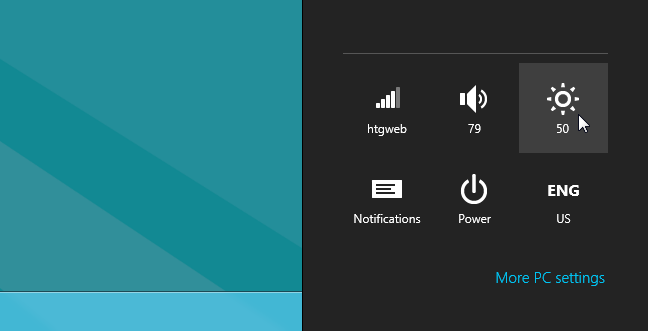
On my MacBook Air, this setting kept fluxuating up and down.
Disabling Adaptive Brightness in Windows 8
Open up the Windows desktop with Win+D, click the power management icon in the tray, and then choose More power options from the menu.
Note that you could also use the Metro search screen to get to the Power Options panel.
Once here, click the “Change plan settings” link on the selected plan.

Then click the “Change advanced power settings” link.

And now, browse down to Display –> Enable adaptive brightness, and change the settings there to Off.

Changing this setting fixed my brightness problems on my MacBook Air running Windows 8 through Boot Camp.
Tuesday, February 28, 2012
How to calculate income tax rebate
http://in.answers.yahoo.com/question/index?qid=20110416075019AAT04ta
http://financeminister.in/latest-india-income-tax-slabs
http://law.incometaxindia.gov.in/DIT/Xtras/taxcalc.aspx
http://www.pankajbatra.com/india/income-tax-calculator-financial-year-2010-2011/
http://finotax.com/itax/itax1011.htm
http://www.simpletaxindia.net/2011/02/income-tax-calculator-budget-2011-fy.html
For Men
Upto Rs. 1,80,000/- Nil
Rs. 1,80,001/- to Rs. 5,00,000/- 10 per cent.
Rs. 5,00,001/- to Rs. 8,00,000 20 per cent.
Above Rs. 8,00,000/- 30 per cent.
For Women
Upto Rs. 1,90,000/- Nil
Rs. 1,90,000/- to Rs. 5,00,000/- 10 per cent.
Rs. 5,00,001/- to Rs. 8,00,000 20 per cent.
Above Rs. 8,00,000/- 30 per cent.
For resident individual of 60 years or above (Senior Citizens).
Upto Rs. 2,50,000/- Nil
Rs. 2,50,001/- to Rs. 5,00,000/- 10 per cent.
Rs. 5,00,001/- to Rs. 8,00,000 20 per cent.
Above Rs. 8,00,000/- 30 per cent.
... For resident individual of 80 years or above (Very Senior Citizens).
Upto Rs. 5,00,000/- Nil
Rs. 5,00,001/- to Rs. 8,00,000 20 per cent.
Above Rs. 8,00,000/- 30 per cent.
Read more: http://
http://financeminister.in/latest-india-income-tax-slabs
http://law.incometaxindia.gov.in/DIT/Xtras/taxcalc.aspx
http://www.pankajbatra.com/india/income-tax-calculator-financial-year-2010-2011/
http://finotax.com/itax/itax1011.htm
http://www.simpletaxindia.net/2011/02/income-tax-calculator-budget-2011-fy.html
For Men
Upto Rs. 1,80,000/- Nil
Rs. 1,80,001/- to Rs. 5,00,000/- 10 per cent.
Rs. 5,00,001/- to Rs. 8,00,000 20 per cent.
Above Rs. 8,00,000/- 30 per cent.
For Women
Upto Rs. 1,90,000/- Nil
Rs. 1,90,000/- to Rs. 5,00,000/- 10 per cent.
Rs. 5,00,001/- to Rs. 8,00,000 20 per cent.
Above Rs. 8,00,000/- 30 per cent.
For resident individual of 60 years or above (Senior Citizens).
Upto Rs. 2,50,000/- Nil
Rs. 2,50,001/- to Rs. 5,00,000/- 10 per cent.
Rs. 5,00,001/- to Rs. 8,00,000 20 per cent.
Above Rs. 8,00,000/- 30 per cent.
... For resident individual of 80 years or above (Very Senior Citizens).
Upto Rs. 5,00,000/- Nil
Rs. 5,00,001/- to Rs. 8,00,000 20 per cent.
Above Rs. 8,00,000/- 30 per cent.
Read more: http://
Tuesday, February 21, 2012
Love quotes to say to someone special
Wanna say sorry to someone you care for or someonr you love a lot but incidentley hurt him/her or had and argument, now dont know where to start from or how to say sorry. Here are the 20 nice quotes to say sorry. Say sorry through sorry cards and sorry pics, sorry greetings.


19 sorry quotes you have read in the sorry pics and sorry cards above below is the twentieth one by me which I used to say a lot whern ever I hurt anyone or had fight with anyone and really wanna to all settle down
"Hey sorry yaar nothing was intetional juss ho gaya, give me one last chance age se kabhi nahin hoga"
~~~~~~~~~~~~~~~~~~~~~~~~~~~~~~~~~~~~~~~~~~~~~~~~~~~~~~~~~~~~~~~~~~~~~


19 sorry quotes you have read in the sorry pics and sorry cards above below is the twentieth one by me which I used to say a lot whern ever I hurt anyone or had fight with anyone and really wanna to all settle down
"Hey sorry yaar nothing was intetional juss ho gaya, give me one last chance age se kabhi nahin hoga"
~~~~~~~~~~~~~~~~~~~~~~~~~~~~~~~~~~~~~~~~~~~~~~~~~~~~~~~~~~~~~~~~~~~~~
Subscribe to:
Posts (Atom)